WORKFORCE CYBERSECURITY · PRACTICAL TRAINING
Phishing Awareness: Microsoft 365, Google Workspace & AI Threats
Practise recognising deceptive messages, device-code requests, malicious app permissions and AI impersonation. Inspect realistic screenshots, use VirusTotal safely and respond without exposing company data.
 BlueTeam Academy
After this course, learners will…
What learners can do
- Recognise phishing across email, QR codes, collaboration tools, device-code sign-ins and AI-generated voice or video.
- Verify requests through trusted channels and assess links or file hashes without uploading confidential documents to public services.
- Report a suspected compromise promptly, preserve useful details and follow the company’s response instructions.
Benefits for your company
- Employees can interrupt fraudulent requests before granting access, transferring money or sharing sensitive data.
- Security teams receive more useful reports while confidential files stay within approved analysis channels.
FROM RECOGNITION TO RESPONSE
Twelve modules. Decisions you can use at work.
12 lessons0.8 hExercises take additional time.
Explore the outline. Open a section to see the lessons and topics inside.
12 lessons shown
01Read the request, not the branding
6 slides
Separate a familiar appearance from verified authority and expected work.
Topics you will explore
- Identify the decision being requested
- Separate identity from appearance
- Verify through a route you already trust
02Inspect links without taking the bait
6 slides
Identify the real host and use an independent route instead of testing suspicious links.
Topics you will explore
- Read the host, not the reassuring words
- Inspect without opening
- Use the known application
03Microsoft device-code phishing
6 slides
Recognise an attacker-supplied device code even on a genuine Microsoft sign-in page.
Topics you will explore
- A meeting code can be an authorisation request
- A real Microsoft page can be part of the deception
- Stop unsolicited device sign-in
04Microsoft app consent and fake IT support
6 slides
Distinguish signing in from granting an application access to company data.
Topics you will explore
- Sign-in and consent are different decisions
- Read the scope of access
- Treat support as a verified role
05Google Workspace sharing and OAuth traps
6 slides
Evaluate Drive, Docs and Calendar lures and unexpected Google permission requests.
Topics you will explore
- A genuine sharing service can carry an untrusted request
- Review Google app access separately
- Check the account and business context
06MFA fatigue and session theft
6 slides
Reject unexpected approvals and understand the limits of codes, MFA and password changes.
Topics you will explore
- An approval must match an action you initiated
- MFA does not make every workflow safe
- Protect the session as well as the password
07QR codes, Teams, Chat and mobile phishing
6 slides
Apply the same verification process across channels and smaller screens.
Topics you will explore
- A QR code is another way to carry a destination
- Chat familiarity is not authority
- Keep verification on a trusted route
08AI impersonation and payment fraud
6 slides
Verify identity and authority without relying on convincing text, voice or video.
Topics you will explore
- Convincing content is cheap evidence
- Verify the transaction, not the performance
- Keep AI tools inside the data boundary
09Attachments, fake CAPTCHA and browser extensions
6 slides
Recognise unsafe execution and permission requests disguised as routine work.
Topics you will explore
- File names and previews are not guarantees
- A security check should not ask you to run code
- Extensions and support tools grant capabilities
10VirusTotal: a safe investigation workflow
6 slides
Check permitted indicators or file hashes and interpret reports without treating them as clearance.
Topics you will explore
- Decide whether external checking is permitted
- Read the exact report and its limits
- Use the result to support a decision
11VirusTotal: protect confidential information
6 slides
Decide what must stay inside approved company analysis channels and why.
Topics you will explore
- Public analysis can become a disclosure
- A link can carry a secret
- Use an approved private investigation route
12Report, contain and recover
6 slides
Report what happened promptly, preserve useful evidence and coordinate recovery.
Topics you will explore
- Report the action actually taken
- Contain through the established response process
- Apply the complete decision method
No lessons match your search. Try another topic or clear the search.
24-question scenario assessment · 80% pass mark
Complete each module’s coached decision, separate knowledge check and written application before the final assessment.
VERIFY THE REQUEST
A convincing message is only the beginning.
Employees, managers, executive assistants, finance and HR teams using Microsoft 365 or Google Workspace. No technical background required.
Modern phishing can use a genuine Microsoft sign-in page, a real Google sharing notification, a familiar voice or a compromised supplier conversation. Work through fictional Northstar workplace cases and learn to inspect the requested action, verify independently and protect company information.
Examples cover Microsoft Entra and Microsoft 365, Google Workspace, device-code authorization, OAuth consent, session theft, QR codes, collaboration messages, AI-assisted fraud and fake verification prompts. The course teaches practical decisions without requiring learners to visit attack sites or handle malware.
LOOK. DECIDE. EXPLAIN.
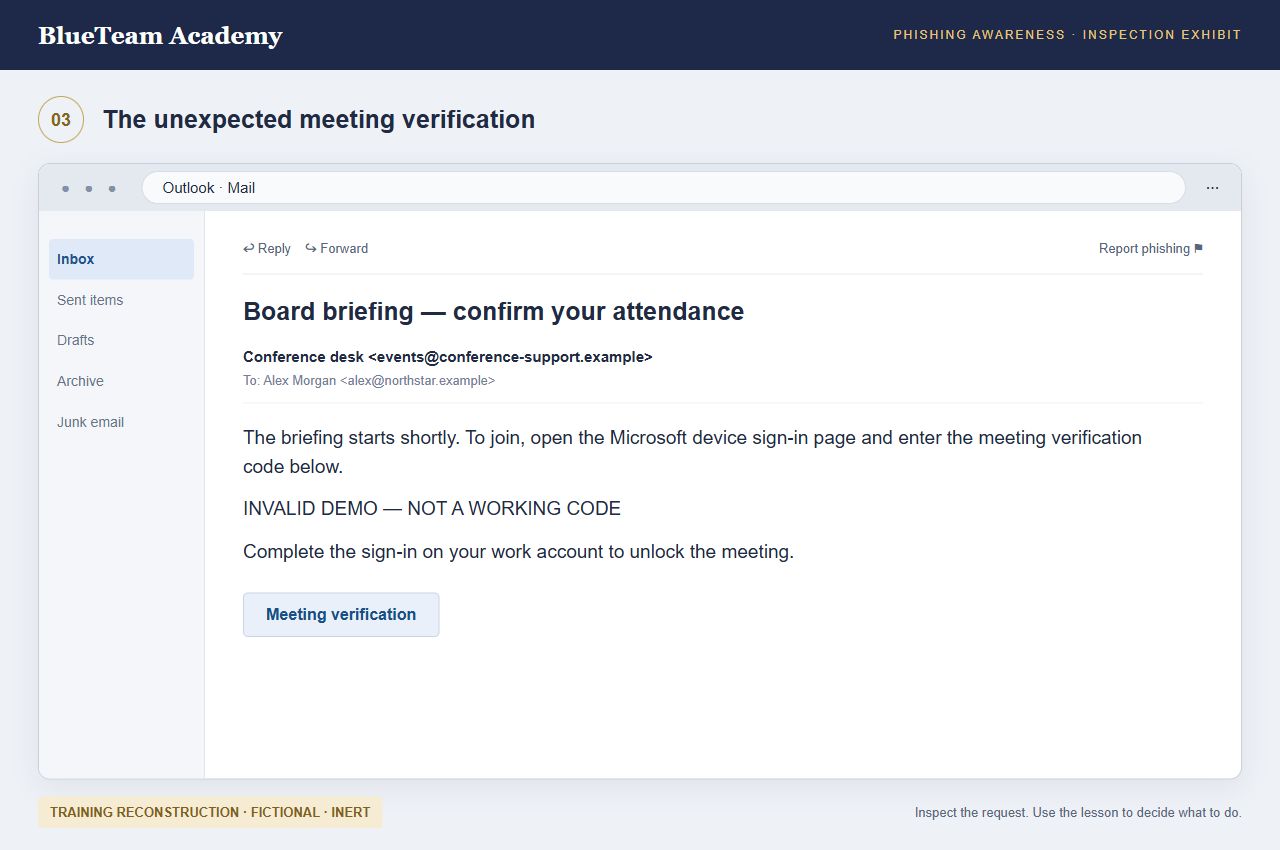
Inspect the screen before making a decision.
Practice with consequences
Each module has a case briefing, three teaching steps, a coached decision and a written application. Inspect screenshots at full size, reveal the teaching points and revise your choice after reviewing the consequences. Each slide is narrated in your selected course language.
Use VirusTotal without creating a data leak
Decide which indicators may be queried, use approved file-hash lookups, interpret report age and detections, and recognise when to stop. Confidential attachments and private sharing or reset links belong in approved internal investigation channels. A public scan can disclose the very information you are trying to protect.
Course text, screenshots, field guide and assessments follow your selected language. Narration is available for every slide in all nine course languages. You can also read the transcript without audio. Screenshots are fictional teaching reconstructions, not evidence of real incidents; interfaces are simplified and may differ from your organisation’s configuration. No working attack links, usable device codes or executable commands are included. Complete all module work, save your professional role and pass the final assessment for a named completion certificate. Written work is retained for review, not independently graded. Completion is not a guarantee of threat detection.
Primary reference material
- Microsoft: documented device-code phishing
- Microsoft: adversary-in-the-middle phishing and stolen sessions
- Microsoft: ClickFix social engineering
- Google: reviewing and removing third-party access
- Google: avoid and report phishing
- Google: legitimate limited-input device authorization
- FBI: AI-generated voice impersonation
- VirusTotal: how submissions and sharing work
- VirusTotal: searches and sensitive indicators
- VirusTotal: interpreting reports
- VirusTotal: Private Scanning is a separate service
AI
Practical AI use, with human judgement.
This course includes role-specific ways to use approved AI assistance, relevant AI threats and failure cases, and checks for evidence, data handling and human approval. Optional prompts use fictional information; an AI account is not required.
AI examples are practical learning activities. They do not add statutory training requirements or replace your organisation’s policies, qualified advice or accountable decisions.